
Digital Inspection App
A digital inspection app lets you carry out inspections, surveys and checks on a mobile device instead of relying on paper forms or returning to a desktop computer for every stage of the job.
A good digital inspection app should do more than replace a paper checklist. It should make it easier to complete inspections in the field, capture the evidence you need, keep information organised and turn inspection results into useful reports and follow-up actions.
BrightChecker is a digital inspection app for carrying out inspections on phones and tablets, with the wider platform supporting the process from preparing an inspection through to reporting, property management and resolving issues.
What is a digital inspection app?
A digital inspection app is mobile software used to record the results of an inspection or survey while the work is being carried out.
Instead of writing findings on paper and transferring them later, the inspector records information directly into the app. Depending on the inspection, this might include:
- checklist responses
- observations and notes
- photographs and other evidence
- measurements
- location information
- dates and inspection details
- identified defects or issues
The information can then be used to produce inspection reports and, where required, create follow-up actions.
Digital inspection apps can therefore be used for property inspections, facilities inspections, maintenance checks, health and safety inspections, asset inspections and many other forms of field-based inspection.
What should a digital inspection app do?
The basic idea sounds simple: replace the paper checklist with a digital one.
In practice, the app has to work while someone is actually carrying out an inspection.
The inspector may be walking around a property, working outside, holding a phone in one hand, dealing with an interruption or changing an assessment after looking more closely at something.
That is why the interface matters.
Quick access to the actions you use most
BrightChecker places core actions around the edges of the screen rather than filling the centre of the display.
This makes commonly used controls easier to reach and supports one-handed use whether the device is held in the left or right hand.
[SCREENSHOT — annotate the main controls around the screen]Keep the inspection screen uncluttered
An inspection screen can contain a lot of information without needing a lot of buttons.
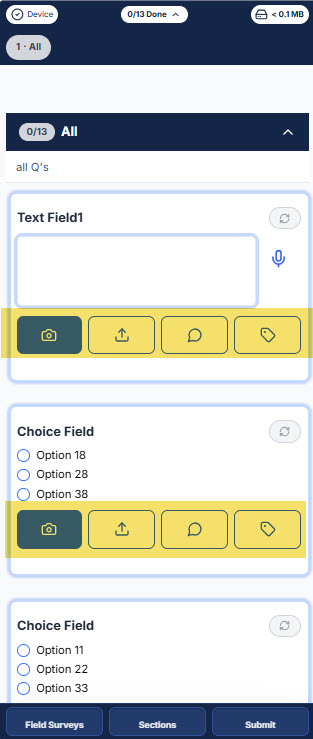
Controls for each inspection question sit within a defined area of the screen, leaving most of the display clear for reading and scrolling through the inspection.
That separation means you can move through the inspection without constantly worrying about accidentally triggering an action.
In the screenshot below , we’ve highlighted the controls for question responses, photographs, notes and other inspection actions. They’re kept within easy reach without dominating the screen.
Use interactions people already understand
Inspectors already use phones for work and everyday activities.
There is little value in making them learn an entirely different interaction model because they are carrying out an inspection.
BrightChecker uses familiar mobile behaviours wherever possible.
You see something and expect it to do something — and it does.
The inspection itself can remain specialised without the way you operate the app becoming unnecessarily complicated.
Simple when you need it, deeper when you don’t
The basic inspection flow can be straightforward:
Open the job → complete the inspection → submit it.
But an inspector may need more information along the way.
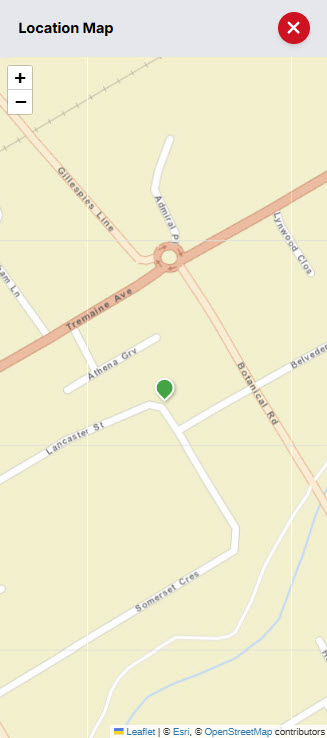
BrightChecker can provide access to property or job instructions, maps, section progress, summaries and navigation without putting all of that information on screen at once.
The result is a layered interface: the immediate task stays clear, while additional information is available when it is needed.
Designed for what actually happens during an inspection
Some of the most useful design decisions come from considering what happens when the inspection doesn’t go perfectly.
Interruptions
Phones are interruption-prone. A call can arrive halfway through an inspection.
An inspector should be able to deal with the call and then return to the inspection rather than having to reconstruct where they were.
Changing your assessment
Inspection involves judgement.

You may look more closely and change your assessment, or realise that you selected the wrong response.
The app needs to make those corrections straightforward rather than making the inspector work around the software.
System status without distraction
Synchronisation is important, but it should not become the focus of the inspection.
BrightChecker makes system status available through subtle visual changes, including colour, so it can be checked quickly without competing with the work being carried out.
A mobile inspection app for real-world conditions
Field inspections aren’t carried out under controlled office lighting.
A screen might be used outside in bright daylight, while moving between rooms or while holding the device in one hand.
Button and text sizes therefore need to balance usability with the amount of information that can sensibly fit on the screen.
BrightChecker’s interface has been designed with these practical considerations in mind, including accessibility principles informed by WCAG guidance.
[SCREENSHOT — annotate text, controls and overall screen layout]Is a digital inspection app worth it?
The case for moving from paper or manual inspection processes isn’t just about giving inspectors a mobile app.

The benefits add up quickly. It can come from reducing duplicated data entry, improving access to inspection information and connecting findings with reporting and follow-up work.
If you’re considering whether to introduce digital inspections, see our [business case for digital inspection software] for a practical look at the potential benefits, costs and considerations.
More than a digital inspection app
A digital inspection app records what you find.
But an inspection is often the starting point, not the end of the work.
A problem identified during an inspection may need to become a finding, an issue, a work order or a maintenance task. The property itself may also have a history of inspections, reports and outstanding work.
BrightChecker connects these stages together:
Inspect → Report → Find → Issue → Work Order → Resolution
The property becomes the link
Every inspection is associated with a property or location.
That means information collected during an inspection can become part of a wider property record rather than remaining as a standalone checklist or PDF.
The property can bring together inspections, reports, issues and work orders, giving the organisation a place to see what has happened and what needs attention.
[SCREENSHOT — Property Command Centre showing inspections, reports, issues and work]Turn findings into action
Finding a problem is only useful if something happens next.
An inspection finding can lead to an issue that needs attention, which can then become work to be allocated and tracked through to completion.
This creates a direct connection between what the inspector discovers and what the organisation needs to do about it.
Build a history of the property
Over time, inspections create a record of what has been found at a property.
Reports provide the documented results. Findings identify what matters. Issues and work orders provide a way to manage what needs to happen afterwards.
The result is more than a collection of inspection reports. It becomes a developing record of the property and the work associated with it.
Prepare, inspect, report and resolve
The mobile inspection app is one part of the wider BrightChecker workflow.
Prepare → Inspect → Review → Report → Issue → Work → Resolution
Before an inspection, templates and properties can be prepared and inspection jobs created.
During the inspection, the inspector records responses and captures evidence.
Afterwards, the completed information can be reviewed, used to create a report and, where action is required, taken into issues and work orders.
This keeps the inspection connected to the work that follows rather than leaving it as a standalone document.
Create inspections from the field
The mobile app isn’t restricted to completing jobs that somebody else has prepared.
Properties and inspections can also be created from the app itself.
That matters when circumstances change in the field and work needs to begin without returning to an office computer first.
The wider BrightChecker platform also provides administration, review and reporting functions. These are naturally easier to work with on a larger screen, but remain available from mobile devices when required.
Capture evidence as you inspect
A useful inspection record is about more than the answers to a checklist.
Photographs, observations, measurements and other evidence provide context for what was found and support the resulting report.
BrightChecker incorporates evidence capture into the inspection workflow, so information is collected alongside the inspection rather than reconstructed later.
See the digital inspection app in action
The screenshots above show some of the thinking behind BrightChecker’s mobile interface.
The videos show the actual workflow, including creating and completing inspections and taking the resulting information through to reporting and follow-up work.
[VIDEO — Creating an inspection] [VIDEO — Completing an inspection on mobile] [VIDEO — Reviewing and reporting an inspection] [VIDEO — Turning findings into issues/work orders]Frequently asked questions
What is a digital inspection app?
A digital inspection app is software that allows inspections, surveys or checks to be completed digitally on a mobile device. It can replace paper forms and connect inspection information with evidence, reporting and follow-up actions.
What is the difference between a digital inspection app and a digital checklist?
A digital checklist records responses electronically. A broader inspection platform can connect those responses with evidence, reports, properties, findings, issues and work orders.
Can a digital inspection app be used offline?
Many field inspection apps provide offline working where connectivity is limited. BrightChecker is designed for field use, with inspection information and media handled through its synchronisation and upload process.
Can I take photographs during an inspection?
Yes. BrightChecker allows photographs and other evidence to be captured as part of the inspection workflow.
Can a digital inspection app create reports?
Yes. BrightChecker uses completed inspection data as the basis for report creation, reducing the need to manually recreate information collected in the field.
Can I create my own inspection checklists?
Yes. BrightChecker provides a checklist library and allows organisations to adapt existing templates or create their own inspection templates.
Can inspection findings become work orders?
Yes. BrightChecker can take findings through to issues and work orders where further action is required.
Is BrightChecker only for property inspections?
No. BrightChecker is particularly suited to property and building inspections, but the underlying inspection workflow can be used for many types of field-based inspections and checks.
Can inspections be carried out on a phone?
Yes. The inspection experience is designed specifically for mobile devices, while the wider BrightChecker platform also provides administration, review, reporting and property/work management functions.
Related digital inspection topics
- Digital Inspection Software
- Digital Inspection Forms
- Digital Inspection Checklists
- Digital Inspection Reporting
- Digital Inspection Workflow
- Offline Inspection Software